
Arduino UNO Q: The Linux-Powered Board Bringing AI to Electronics and Robotics

The Arduino UNO Q pairs a Qualcomm Dragonwing processor running Debian Linux with an STM32 real-time microcontroller, bringing Python, Edge AI and Arduino App Lab to the classic UNO form factor. Here is what it offers – and when it is coming to Oku Electronics.
By Oku Electronics · Editorial timeframe: November 2026 · Approx. 11 min read
For two decades, the Arduino name has meant one thing to most engineers and students: a simple microcontroller board that reads a sensor, switches an LED or drives a motor, programmed from a friendly editor on a laptop. That formula taught millions of people electronics. But the projects people now want to build – robots that recognise objects, farm monitors that understand what a camera sees, machines that respond to spoken commands – demand far more computing power than a classic microcontroller can provide.
The Arduino UNO Q is Arduino’s answer. Announced in October 2025, it keeps the familiar UNO shape and Arduino programming model, but adds a full Linux computer to the same board. The result is a single, affordable development platform that can run Python programs and AI models on one processor while a second processor handles precise, real-time hardware control. For students, makers and engineers in Ghana and across Africa, it is one of the most interesting boards to arrive in years.
A New Chapter in Arduino Development
Traditional Arduino boards are built around microcontrollers. These chips are excellent at doing simple jobs reliably and with very precise timing, but they have kilobytes or a few megabytes of memory, no operating system in the desktop sense and limited processing power. Anything heavier – image processing, databases, web dashboards, machine learning – usually meant adding a separate single-board computer such as a Raspberry Pi and wiring the two together.
That works, but it means extra cost, extra wiring and two separate software worlds. The UNO Q puts both halves on one circuit board and in one development tool: Linux provides networking, Python, cameras and AI frameworks, while the microcontroller keeps the deterministic timing that motors and sensors depend on. Arduino calls this a “dual-brain” design.
What Is the Arduino UNO Q?
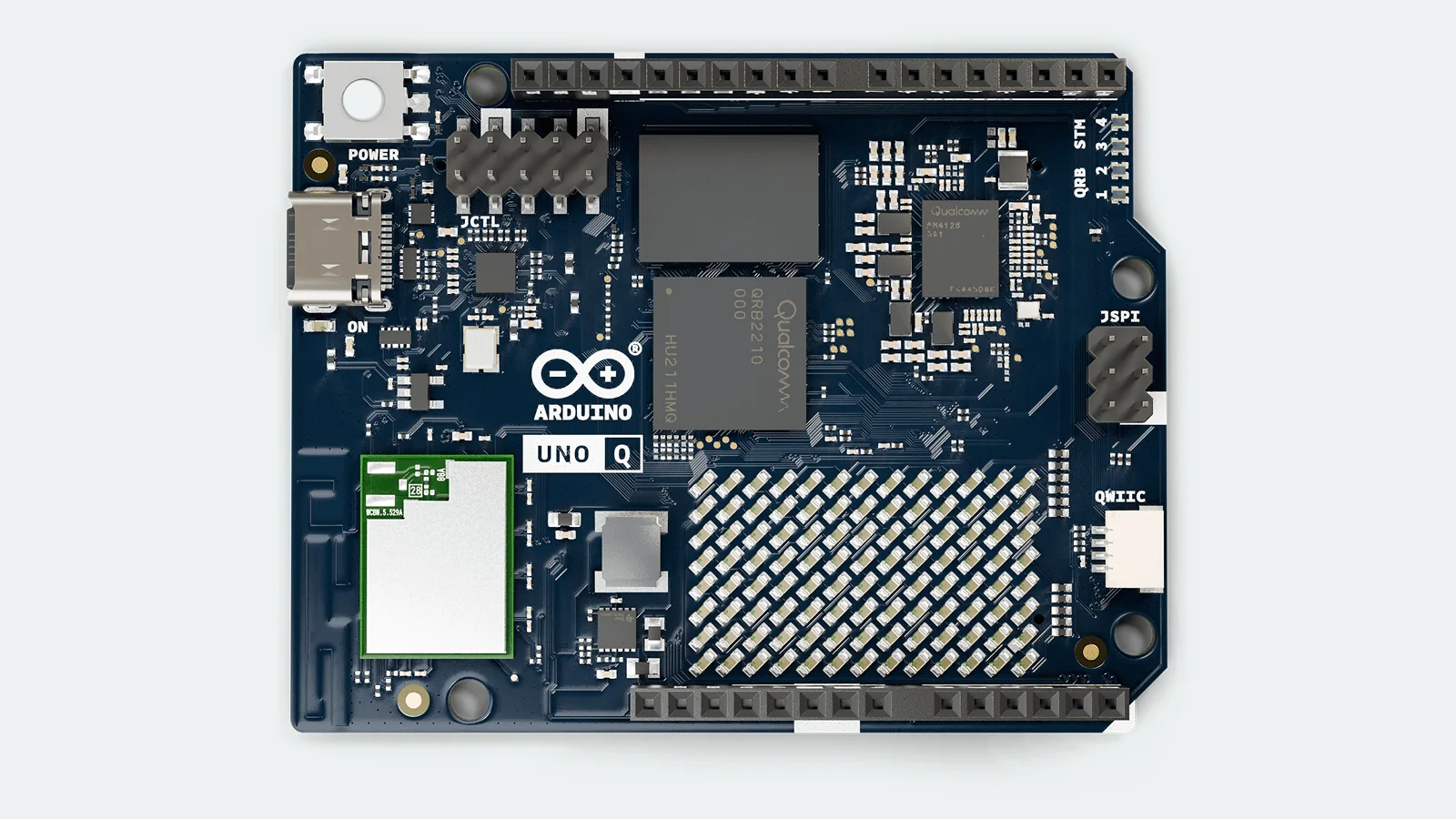
The Arduino UNO Q is a hybrid development board – part single-board computer, part microcontroller board – in the standard 68.58 × 53.34 mm UNO footprint. Because it keeps the classic header layout, it works with a wide range of existing Arduino shields, modules and libraries. It can be programmed from a laptop over USB-C, accessed over Wi-Fi, or used on its own as a small desktop computer with a monitor, keyboard and mouse connected through a USB-C hub.
Inside are two distinct processing systems, each chosen for what it does best.
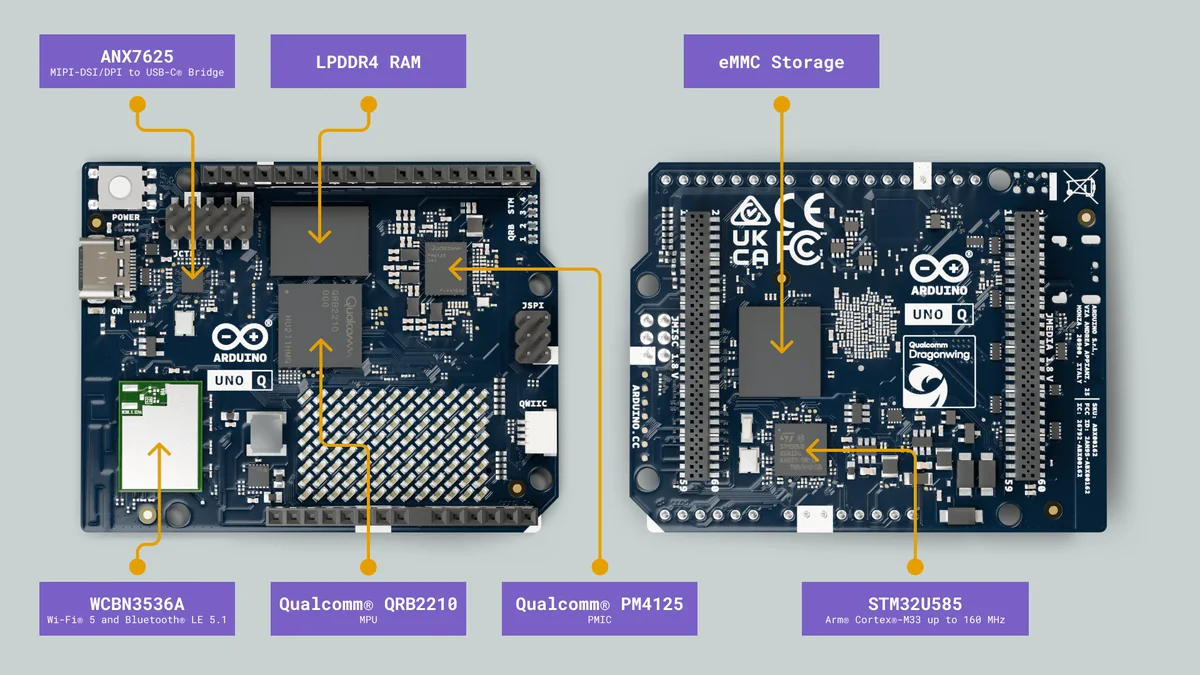
Qualcomm Dragonwing QRB2210
The main processor is a Qualcomm Dragonwing QRB2210 with four Arm Cortex-A53 cores running at up to 2.0 GHz, an Adreno 702 graphics processor and two image signal processors for cameras. It runs Debian Linux, together with 2 GB or 4 GB of LPDDR4 memory and 16 GB or 32 GB of built-in eMMC storage. This side of the board handles Linux applications, Python code, networking, video output and AI inference.
STM32U585 Microcontroller
The second processor is an STMicroelectronics STM32U585, a low-power Arm Cortex-M33 microcontroller running at up to 160 MHz with 2 MB of flash and 786 KB of SRAM. It runs Arduino sketches on top of the Zephyr real-time operating system and is connected to the familiar UNO headers. Reading sensors, generating PWM for motors, sampling analogue signals and responding instantly to inputs all happen here, unaffected by whatever Linux is doing.
How Both Processors Work Together
Consider a small warehouse robot that must follow a line and stop for obstacles, but also recognise coloured parcels with a camera. On the UNO Q, the STM32U585 runs the motor control loop, reads the line sensors and handles the emergency-stop input every few milliseconds. Meanwhile, the QRB2210 processes camera frames with a vision model in Python. When it identifies a parcel, it sends a short command to the microcontroller – “slow down and turn left” – through Arduino’s Bridge library, which uses remote procedure calls (RPC) over an internal link between the two chips. Because the control loop runs on its own processor, it is not held up by whatever Linux happens to be doing.
Arduino UNO Q Technical Specifications
The table below summarises the main hardware features published by Arduino. Both memory versions share the same processors, connectivity and I/O.
| Feature | Arduino UNO Q specification |
|---|---|
| Microprocessor (MPU) | Qualcomm Dragonwing QRB2210, quad-core Arm Cortex-A53 at up to 2.0 GHz |
| Graphics and imaging | Adreno 702 GPU at 845 MHz; two image signal processors (13 MP + 13 MP, or 25 MP, at 30 fps) |
| Linux operating system | Debian Linux with upstream support |
| Microcontroller (MCU) | STMicroelectronics STM32U585, Arm Cortex-M33 at up to 160 MHz |
| MCU memory | 2 MB flash, 786 KB SRAM |
| MCU operating system | Arduino code running on the Zephyr real-time OS |
| RAM | 2 GB or 4 GB LPDDR4 |
| Storage | 16 GB or 32 GB eMMC, built in (no microSD card needed) |
| Wireless | Dual-band Wi-Fi 5 (802.11ac, 2.4/5 GHz) and Bluetooth 5.1, onboard antenna |
| USB | One USB-C port: power, data, host/device role switching and video output |
| Power input | 5 V up to 3 A via USB-C; 7–24 V DC via the VIN pin |
| MCU I/O | UNO-style headers, 6 × 14-bit ADC inputs, 2 × 12-bit DAC, 6 × PWM, CAN FD, I²C, SPI, UART |
| Logic levels | MCU pins: 3.3 V logic, 5 V tolerant (except A0 and A1). MPU pins: 1.8 V |
| Other connectors | Qwiic (I²C), JMISC and JMEDIA high-speed headers (camera, display, audio), JCTL debug |
| On-board extras | 8 × 13 LED matrix, user RGB LEDs, power button |
| Dimensions | 68.58 × 53.34 mm (classic UNO form factor) |
Good to know
The microcontroller’s GPIO pins use 3.3 V logic. Most are 5 V tolerant, but Arduino notes that analogue pins A0 and A1 are not, so check voltage levels before connecting older 5 V modules. A USB-C power supply rated for 5 V / 3 A is recommended, particularly when using the board as a desktop computer with peripherals.
Running Debian Linux on Arduino
Linux support is the feature that most clearly separates the UNO Q from earlier UNO boards. Because the QRB2210 runs a standard Debian distribution, developers can use the same tools found on servers and desktop computers: a terminal, SSH, a package manager, Python and its huge library ecosystem, web servers, databases and containerised applications.
That opens up projects that were awkward on earlier Arduino hardware. A data logger can store months of readings in a local database and serve a web dashboard over Wi-Fi. A prototype product can run its interface and cloud connection on Linux while the microcontroller does the electrical work. For students, it is also a practical introduction to embedded Linux – a skill in demand across telecoms, automotive and industrial automation.
Artificial Intelligence and Edge Computing
Edge AI means running artificial intelligence models on the device itself, close to the sensors, rather than sending every image or audio clip to a remote cloud server. Processing data locally reduces delay, keeps working when the internet connection drops and avoids sending sensitive data off-site – all valuable advantages where connectivity is costly or unreliable.
The UNO Q is designed for this kind of lightweight, practical AI. Arduino provides ready-to-use models and examples for tasks such as object detection, image classification, keyword spotting and anomaly detection, and Arduino App Lab integrates with Edge Impulse, Qualcomm’s platform for training custom models. Realistic project ideas include:
- Intelligent robotics – robots that detect people, objects or obstacles with a camera while the MCU drives the motors.
- Computer vision – counting items on a conveyor, reading QR codes or spotting defects in products.
- Smart agriculture – monitoring soil and climate sensors, or using a camera model trained to recognise common crop problems.
- Industrial automation – detecting unusual vibration or sound patterns in machines before a breakdown.
- IoT monitoring – collecting and analysing sensor data locally and sending only summaries or alerts to the cloud.
- Voice-controlled electronics – responding to wake words or short spoken commands to switch devices.
It is important to keep expectations realistic. The QRB2210 is an entry-level processor, so the UNO Q is best suited to compact, optimised models rather than large language models or high-resolution, high-frame-rate video analysis. Performance depends on model size, input resolution and available memory, and the 4 GB version gives noticeably more headroom for demanding AI and camera applications.
Understanding the Dual-Processor Architecture
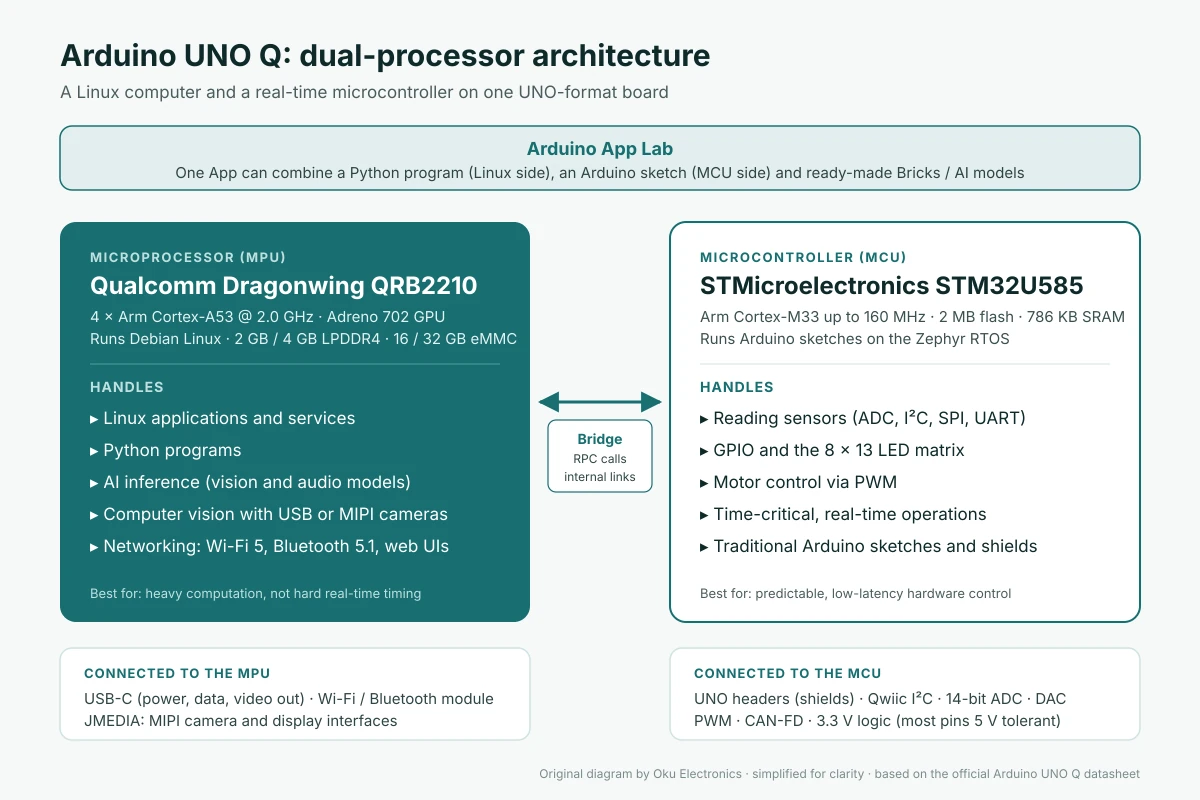
Linux is a general-purpose operating system: it juggles many programs and network traffic, and cannot guarantee that a task runs within a precise time window. That is fine for analysing an image, but not for generating a motor signal or reacting to a limit switch.
A microcontroller running a real-time OS is the opposite: far less computing power, but predictable timing. By giving heavy computation to the QRB2210 and time-critical I/O to the STM32U585, the UNO Q gets the strengths of both – and the Bridge RPC library lets a Python program call a function in an Arduino sketch, and vice versa, in a few lines of code.
Arduino App Lab
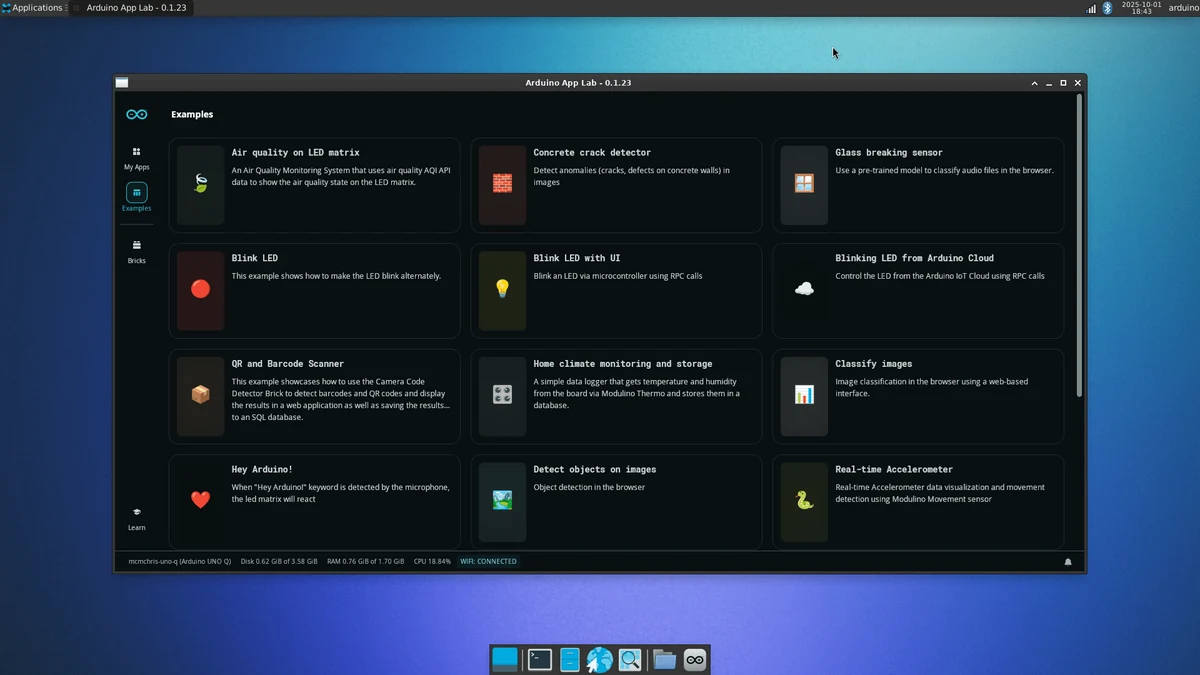
To make this dual-processor design approachable, Arduino introduced Arduino App Lab, a new development environment launched alongside the UNO Q. App Lab is pre-installed on the board and is also available as a desktop application for Windows, macOS and Linux. In App Lab, a project is called an App, and a single App can contain an Arduino sketch for the microcontroller and a Python program for the Linux side, developed and launched together.
App Lab also introduces Bricks – ready-made building blocks that package common functions such as a web interface, a database, camera access or a pre-trained AI model. Instead of writing everything from scratch, users can start from an example, add Bricks and then customise the code. App Lab can be used directly on the board in single-board computer mode, from a computer connected by USB, or over the local network. Developers who prefer familiar tools can still program the microcontroller from the Arduino IDE.
Arduino UNO Q 2GB vs. 4GB
The UNO Q is offered in two memory configurations. The processors, wireless connectivity, headers and software are identical; the difference is RAM and storage.
| UNO Q 2GB | UNO Q 4GB | |
|---|---|---|
| Arduino SKU | ABX00162 | ABX00173 |
| RAM | 2 GB LPDDR4 | 4 GB LPDDR4 |
| eMMC storage | 16 GB | 32 GB |
| Processors | Same QRB2210 + STM32U585 | Same QRB2210 + STM32U585 |
| Release (per Arduino) | October 2025 | January 2026 |
| Best suited to | Learning, PC-hosted development, sensor and control projects, lighter AI demos | Using the board as a desktop computer, larger AI models, camera projects, running several services |
The 2 GB version is a sensible choice for learning, classroom use and projects where the board is mainly programmed from a laptop. It comfortably handles sensor logging, Python scripts, simple dashboards and Arduino’s lighter AI examples. The 4 GB version is the better option if you plan to use the UNO Q as a standalone desktop computer – Arduino itself recommends it for that mode – or to run larger vision models, several applications at once or more storage-hungry projects. If you are unsure and budget allows, the extra memory gives more room to grow.
Qualcomm’s Acquisition of Arduino
The UNO Q arrived at a turning point for Arduino. On 7 October 2025, Qualcomm announced an agreement to acquire Arduino, the Italian company behind the open-source electronics platform used by more than 33 million developers. Financial terms were not disclosed. At the end of October 2025, Arduino confirmed that it had officially become part of Qualcomm.
Both companies stated that Arduino would keep its independent brand, tools and mission, and that it would continue to support microcontrollers and processors from other semiconductor manufacturers – a reassurance for the many developers who rely on boards using chips from a wide range of vendors. The deal followed Qualcomm’s earlier acquisitions of Edge Impulse and Foundries.io, and it gives Qualcomm a direct connection to students, makers and start-ups. For developers, the practical outcome so far is the UNO Q itself: a low-cost route into Qualcomm processor technology, packaged with Arduino’s emphasis on accessibility.
Why the Arduino UNO Q Matters for Students and Engineers
In Ghana and across Africa, engineering education often faces the same constraints: limited lab budgets, shared equipment and gaps between what is taught and what industry uses. A board that combines a microcontroller, a Linux computer, Wi-Fi and AI capabilities in one package can help close several of those gaps at once.
- Engineering education – one board can support courses in digital systems, embedded programming, Linux, networking and machine learning, from first-year labs to final-year projects.
- Final-year and research projects – students at universities and technical institutes can build credible prototypes, such as vision-based quality inspection or remote environmental monitoring, without assembling multiple boards.
- Robotics clubs and competitions – teams can add camera-based navigation and object recognition while keeping proven Arduino motor-control code.
- Agriculture and environment – local, offline processing suits farms and field sites where internet access is intermittent; the 7–24 V VIN input also makes battery and solar-powered setups easier to design.
- Start-ups and innovation hubs – entrepreneurs can test product ideas in smart energy, security, logistics and health-adjacent monitoring before investing in custom hardware.
The Future of Embedded Computing
The UNO Q reflects a broader shift in electronics. The line between microcontrollers and computers is blurring, and more devices are expected to sense, interpret and act locally. Robotics, industrial equipment, smart buildings and agricultural technology increasingly need both dependable real-time control and enough computing power to run AI and connect securely to networks.
For anyone building a career in electronics, the valuable skill set now spans microcontroller firmware, Linux, Python and deploying machine learning on constrained hardware. The UNO Q makes it possible to learn all of them on one familiar platform.
Frequently Asked Questions
Can I use my existing Arduino shields with the UNO Q?
In many cases, yes. The UNO Q keeps the UNO form factor and header layout, and Arduino states that it works with a wide range of UNO shields and libraries. Check that each shield works with 3.3 V logic, and note that analogue pins A0 and A1 are not 5 V tolerant.
Is the UNO Q a replacement for a Raspberry Pi?
Not exactly. It can act as a small Linux computer, but its main strength is combining Linux with a dedicated real-time microcontroller in one Arduino-compatible package. For projects that need both computing and precise hardware control, it can replace a two-board setup.
Do I have to use Arduino App Lab?
No. App Lab is the easiest way to build projects that use both processors, but the microcontroller can also be programmed from the Arduino IDE, and the Linux side can be used with standard tools such as SSH and Python.
Can I buy the Arduino UNO Q from Oku Electronics today?
Not yet. Oku Electronics plans to add the Arduino UNO Q to its range in 2027. Availability and pricing will be announced closer to the time.
Arduino UNO Q Coming to Oku Electronics in 2027
Oku Electronics is pleased to announce that we plan to introduce the Arduino UNO Q to our product range in 2027.
As a Ghana-based supplier of Arduino boards, robotics kits, sensors and engineering components, our goal is to make advanced development platforms easier to obtain locally – without the delays and uncertainty of importing them individually. We are working towards bringing the UNO Q, and the new generation of Linux- and AI-capable boards it represents, within reach of customers across Ghana.
We are committed to supporting:
- Engineering students
- Electronics enthusiasts
- Robotics developers
- Researchers
- Educational institutions
- Technology innovators
The Arduino UNO Q is not yet available in our store. Further information about availability and pricing will be announced closer to the planned introduction. In the meantime, visit OkuElectronics.com to explore our current Arduino and microcontroller boards, robotics range and sensors, modules and shields, or contact our team to register your interest.
If you are new to Arduino, our step-by-step guide Getting Started with Embedded Systems: The Arduino Uno “Blink” Project is a good place to begin while you wait.
Sources
- Arduino UNO Q documentation and datasheet – Arduino Docs
- Arduino UNO Q product page – Arduino
- Arduino App Lab documentation – Arduino Docs
- A new chapter for Arduino with Qualcomm, UNO Q and you – Arduino Blog
- Arduino x Qualcomm Technologies: joining forces to empower developers worldwide – Arduino Blog
- Qualcomm to Acquire Arduino – Qualcomm press release
Oku Electronics — Your Ideas, We Make It Possible! Preview generated for Oku Electronics editorial review. Featured image is set as the WordPress featured image, not repeated in the post body.